
CREATING AN EFFORTLESS PRINTING EXPERIENCE
First ever app to get hassle free printouts from nearest print shop
OVERVIEW
Sleefax is a platform that connects users to their nearest print shops, with the facility to share files of all kinds, so that they can get printouts without the hassle of crowding at print shops.
We made Sleefax especially for college students (our first target customers) for whom taking printouts and stationery is a regular part of their curriculum, and are usually faced with long queues and unbearable jumbling at the print shops, especially near colleges.

MY ROLE
I led the entire product design and development of the partner web app during its development lifecycle.
After a strategic and enjoyable research and design process that lasted for over 6 months, I walked away with a mountain of experience and solutions that helped all the stakeholders achieve their respective business goals.
GATHERING DATA
The main goal was to gather information for creating the future website design and to allow objective discussions about it.
-
Build an app that would fully automate the process of printing files.
-
Make it fast and easy to use for everyone, everywhere.
-
Use technology to complement the in-store experience
-
Lay the foundation for innovation and deeper engagement.
-
Embrace a user base centered around college students
DISCOVERY PHASE
We started our user research by going to different print shops near college campuses and collected user data to understand the actual customer pain points.
We analysed user data on the basis of three parameters:
-
Who are we designing solutions for?
-
What are their problems?
-
To what extent are digital tools already being used for printing?
INTERVIEWS AND SURVEYS
During this time, my co-founder Sayan and I were also working in close coordination with the shopkeeper and students from our college, interviewing them regularly to know more about his business and the problems he would face.
We stayed at the print shop for many days consecutively to understand user needs and behavior. We wanted to have enough information before we got into build mode.
We even set up an online survey using google forms and forwarded them to college WhatsApp groups.
-
The intention of our survey was to know if there was a need for such an app.
-
To understand the challenges students and print shop owners faced and the workarounds they employed.
EARLY INSIGHTS FROM THE FIELD
Taking printouts is a hassle if you don't own printers
Even if you do own one for personal purposes, you have to spend a lot of money on ink cartridges and paper.
Chaos at print shops - Very hard to take printouts on time
There are hardly 1-2 shops near colleges to cater to thousands of students from one campus.
No proper system in place
People presently use Gmail, Bluetooth, or WhatsApp to send their files to Printshop, but they still either have to manually type in the printing instructions ( number of copies, color or B/W printout, horizontal or landscape mode, etc.) every time, or go to the shop and tell the shopkeeper.
Poor service quality
The shopkeeper remains too busy with the crowd to keep track of all the orders and dedicate his attention to every customer when he prints their file(s) and when it's ready to be picked up, so the poor feedback system provides additional inconvenience to the students.

COMPETITIVE ANALYSIS
So far, there were no comparable offers, so my research applied to products from the field of printing services, preferably with a focus on potential competitors such as e-commerce companies and hyperlocal delivery service companies.
The creation of competitive profiles together with SWOT analysis helped to assess current offers in this area.
OPPORTUNITIES AND CHALLENGES
Opportunities
Huge market opportunity
The number of colleges and universities in India reached 39,931 and 993, respectively, in FY19. India had 37.4 million students enrolled in higher education in FY19.
Cities like Pune, Mumbai, Bengaluru, and Kota in India are huge clusters for educational institutions where the printing business is growing and booming with increasing and growing literacy rates in India.
First Mover's Advantage
Initial brand recognition in the minds of customers as there is a lack of any other partnership-based, data-driven online print service
.
Automated & Organized Printing Service
Create an end-to-end process for both users as well as shopkeepers that is centered around efficiently getting ready-made printouts from print shops.
Opportunity to create a logistics platform
A delivery service for students within large campuses, reducing point to point travel, which includes automating the printing process for shopkeepers and shifting the whole process online, to mobile and web apps.
Timeliness & availability
Students can schedule pickups at their own feasible time and check live order status from the app thus reducing wait time at the shop.
Challenges
Lack of acceptance
Low acceptance of the students (and some teaching staff), since a change of methodologies and, in general, often also a change in attitudes, including e.g. a higher level of trust is required.
Bad Infrastructure
Reasonable infrastructure, ie a stable Wi-Fi or data connection is needed for uploading files of high upload size.
Operational efficiency
A low level of efficiency can lead to congestion within the workflow, production, and order fulfillment.
Data Security
There is a looming threat of hackers and fraudsters attacking the host server and not just stealing confidential data but also infecting with viruses. Breach of credit and debit card details has become common news, and such lapses directly affect the trust of a consumer.
Agility Challenge
Incorporating quick changes across all platforms, integrating new technologies efficiently with their existing system, and creating personalised experience that inspires consumers.
TASK ANALYSIS
My main focus was on achieving the ideal way to meet the users’ goals and optimizing the desired outcome.
Task analysis helped me to study how a user performs a series of tasks to meet the desired goal.
By analyzing users’ tasks, using contextual inquiry, I discovered key issues in their existing flow and better design opportunities for a smoother experience.
TASK ANALYSIS
My main focus was on achieving the ideal way to meet the users’ goals and optimizing the desired outcome.
Task analysis helped me to study how a user performs a series of tasks to meet the desired goal.
By analyzing users’ tasks, using contextual inquiry, I discovered key issues in their existing flow and better design opportunities for a smoother experience.
CONCEPTUALIZATION
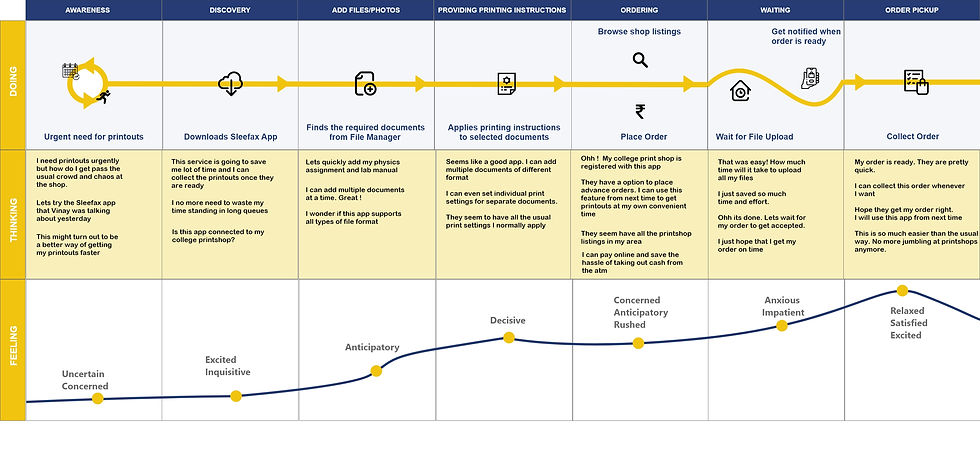
One of the most important steps in my Design Thinking process was to define the users’ problems. This meant being able to clearly identify and articulate problems in the user experience so that I can later begin the process of ideating. Task Analysis and User Journey mapping were essential tools in identifying what opportunities are there to improve the user experience and to generate some preliminary ideas as to how I should approach these challenges

BUILDING A CUSTOMER EXPERIENCE MAP
As a company that sells services, I understood how important it was for us to provide our customers with a great experience not only until the moment they experience our app but also to keep them happy afterward, so they keep coming back for more.
In case of a bad experience, not only our customers will refuse to come back, but they will also influence others not to use our services any further.
A customer journey map helped me to understand the user’s context throughout their experience with our company, our services, and our products.
I understood their motivation, goals, feelings, and thinking which all change as the customer moves throughout the journey.
MOOD BOARDS
Finding inspiration for design projects is one thing. Organizing it and turning that inspiration into a more cohesive base for creating a design that wows users is an entirely different beast.
The solution? Mood boards.
Creating our brand identity
I researched and analyzed the most effective tools for styling our story. Moodboards and style guides were the foundations for defining our brand's identity.
MOODBOARD
Mood board was a powerful tool in building and visualizing our brand identity.
I wanted to capture the overall look and feel of our brand, giving it its own unique personality hence setting the foundation of our business and brand story.
STYLE GUIDE
To distinguish our unique values and to separate our brand from competitors I developed a unique Style guide to help communicate a consistent brand message.
It was an essential tool for communicating our company’s design standards for developers, designers, writers.
It further supported marketing initiatives by ensuring all messaging is relevant and related to brand goals.

BUILDING THE SKELETON
My ultimate goal was to give our users a great user experience (UX). No matter how exceptional our product may be, if our users struggle to find their way around, the negative UX will increase the likelihood that they dump our product. And once you lose a user, bringing them back is next to impossible.
PAPER PROTOTYPING
Paper prototyping was the perfect way for the early-stage conceptualizing of our app.
Its speed, ease, and simplicity, not to mention automatic documentation, made it far better suited for experimenting with new ideas than more complex digital prototypes.
It was an ideal tool for:
-
Brainstorming new concepts and ideas in team meetings and sessions.
-
We could also run a light usability test early on.
-
We created and threw away multiple versions without wasting time.

INFORMATION ARCHITECTURE
Information architecture was a core element of my product design — it helped guarantee a great product experience.
Information architecture may not be visible to my end-users, but it formed the backbone of my product design.
After all, my visual design and navigation was heavily influenced by IA.
I knew that if my information architecture is designed well, users will find it easy and enjoyable to use our product.
Not only will the high customer satisfaction rates lead to loyal users, but it will also lead to more positive reviews.
And as we all well know, positive reviews lead to more new users and, ultimately, significant growth of our user base.

WIREFRAMING
Creating wireframes was an important part of my design process.
With the help of wireframes, I could communicate with various stakeholders and developers for the intended implementation of technical requirements.
They were the foundation on which the features were built. Getting it right from an early point meant a smoother project for everyone.
With the help of wireframes, I could concentrate on layout, arrangement and information architecture.
This was the first time in my project when I was able to see all the strategies behind the IA connected to some visual representation of the site. The paths through the app started to become visible with a wireframe.

HIGH FIDELITY PROTOTYPES
Once usability testing with prototypes was complete and the last revisions were made to the designs, I began creating the final, high-fidelity user interface designs for the product.
It felt like it took a long time to get to this point, but the amount of preparation that went on before coding actually saved a heap of time for the whole team afterward.
It was important for me to test our prototype before giving the final design to the developers to foresee any issues or failures.
In addition to validating designs, interactive prototypes helped me to communicate the designs and functionalities of our product to my team members and other stakeholders in the project because when the functional build of the software is not developed, a high-fidelity prototype does the job very well.

FINAL UI DESIGN
As the developers began building the product or feature, inevitably there were certain elements of the design that didn't function in the way that was envisaged by me.
Therefore, I needed to be on hand to work alongside the developers to find alternative solutions that maintain an optimal user experience.
I needed to check in regularly with the developers while they were building the product to ensure that the designs have been correctly interpreted and implemented.

LAUNCH
We launched in our department first as a beta test.
We have around 250 users who signed up organically within the first 3 days.
Students started using our app and we created quite a buzz among college students.
Before we could do a bigger scale launch the pandemic hit and with colleges closed, most of these users currently aren't actively using the product.

APP VIDEO
Download now from Google Playstore
https://play.google.com/store/apps/details?id=com.Anubis.Sleefax